Stop Paying for Over-Provisioned Kubernetes Resources
KorPro's Efficiency mode detects over-provisioned containers and idle workloads across GKE, EKS, and AKS — so you can rightsize without manual profiling.
Kubernetes waste is invisible — until you measure it
average CPU over-provisioning across Kubernetes clusters
of running pods are idle with zero inbound traffic
spent manually profiling workload resource usage per sprint
What you'll see in Efficiency mode
Rightsizing recommendations and idle workload flags — per pod, per namespace, across every cluster.
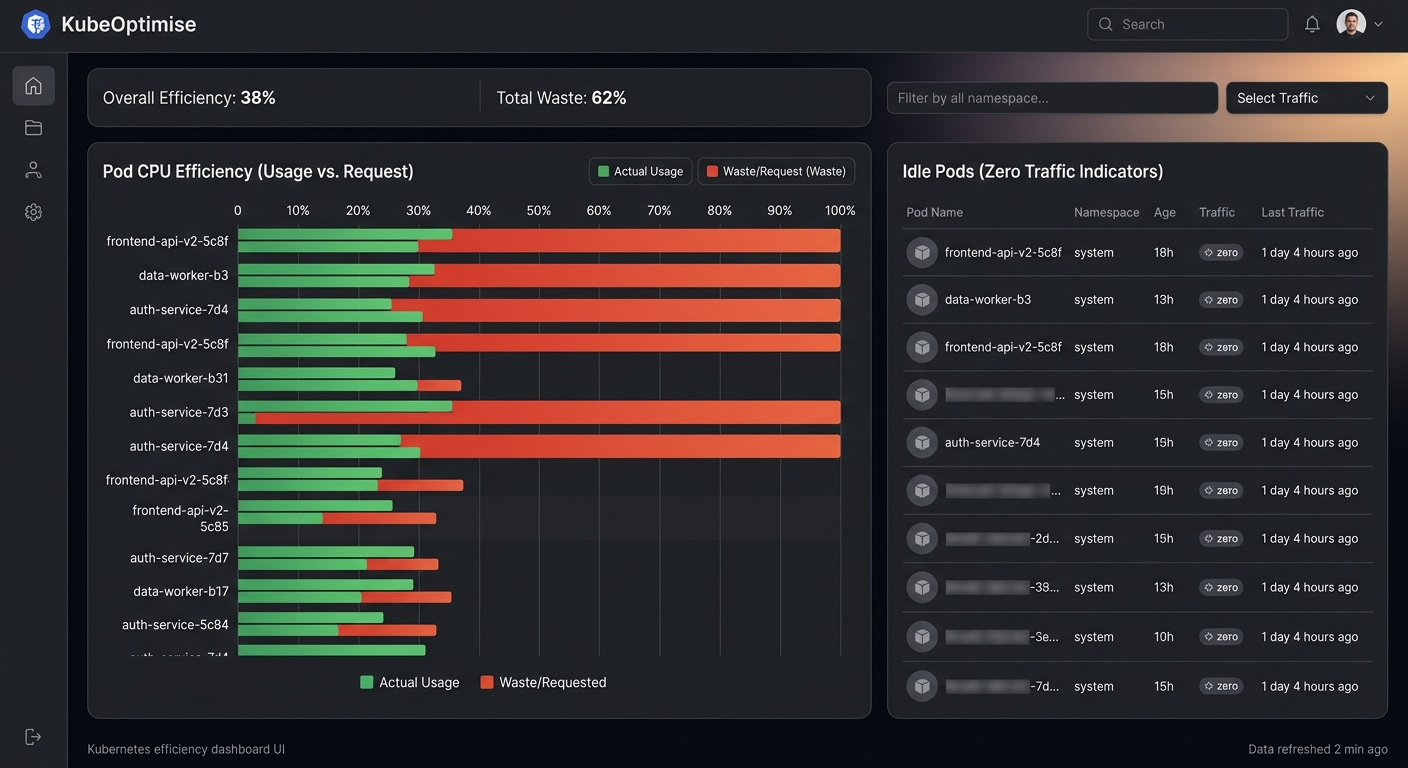
What Efficiency mode detects
A single scan surfaces rightsizing opportunities, idle workloads, and orphaned resources.
Over-provisioned CPU requests
Containers requesting far more CPU than they use — KorPro surfaces actual vs requested ratios per pod.
Over-provisioned memory limits
Memory limits set 10× higher than peak usage, wasting node capacity and blocking bin-packing.
Idle pods (zero traffic)
Deployments and StatefulSets running with no inbound requests — burning compute for nothing.
Idle replica sets
Scaled-out replicas that receive no traffic share — candidates for scale-down.
Orphaned resources (bonus)
Efficiency mode also runs the full orphaned resource scan — ConfigMaps, Secrets, PVCs, Services — in the same pass.
Your first rightsizing scan is 5 minutes away
Create a free account, install the Inspector in Efficiency mode, and see CPU/memory recommendations per workload.
Start free auditRead-only RBAC · GKE, EKS & AKS · No credit card