Find the money you're wasting on Kubernetes & cloud — and get it back
KorPro is self-hosted — the Inspector runs inside your own cluster and scans your connected cloud services, then hands your team a ranked report of what's over-provisioned, idle, or orphaned, each with its dollar impact and the exact fix. One read-only scan. No code changes. Your data never leaves your environment.



One scan. A ranked worklist. Dollar impact on every line.
Watch KorPro scan a cluster and its cloud services, then surface over-provisioned, idle, and orphaned resources — each with the exact fix to reclaim the spend.
How it saves you money
The three ways KorPro cuts your bill
One read-only scan covers your whole cost picture — inside the cluster and across the cloud services around it.
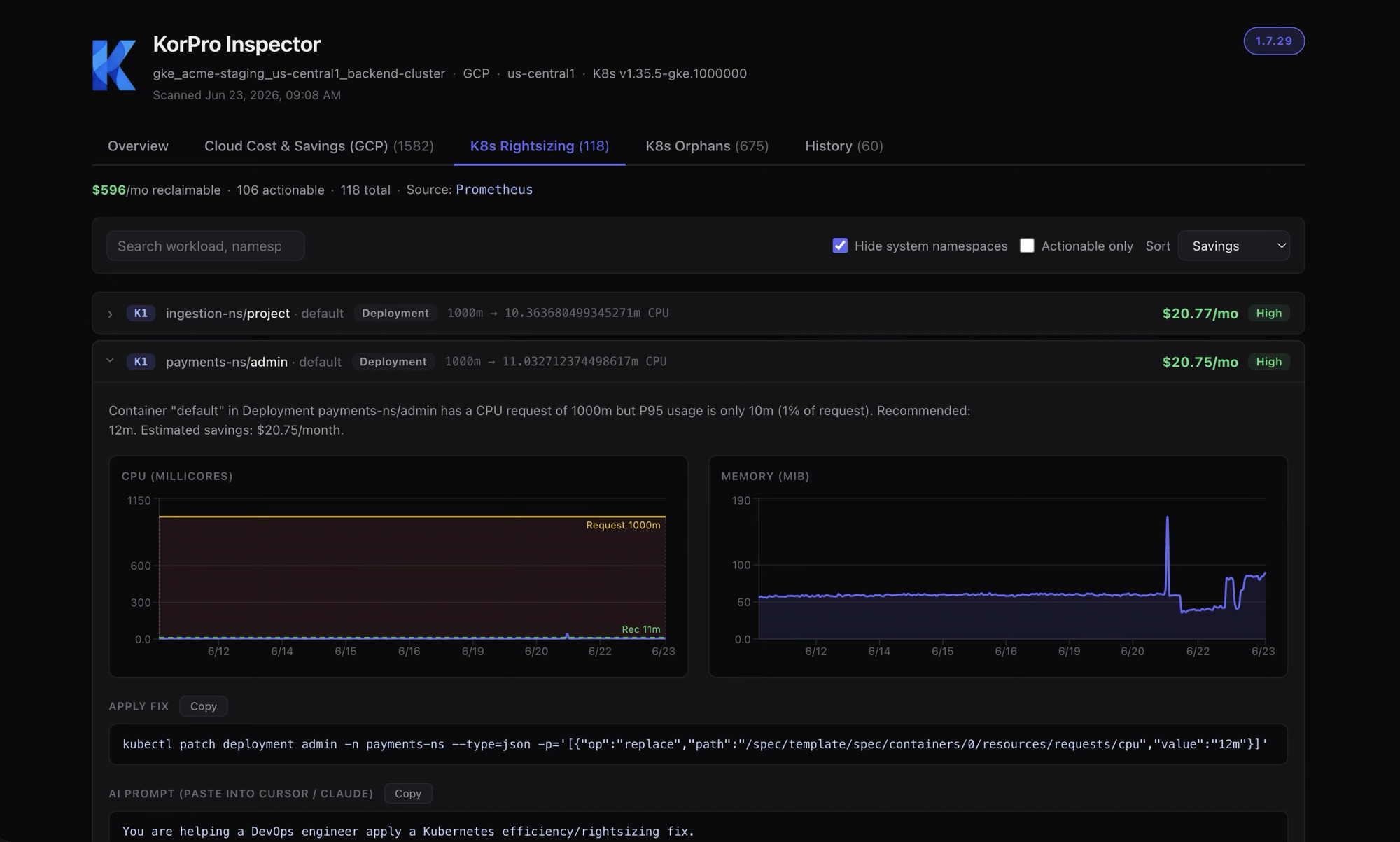
Kubernetes Right-Sizing
Stop paying for requested-but-unused CPU and memory.
- Detects over-provisioned CPU & memory from real usage (P95 + headroom — never below your peaks)
- Flags idle deployments, spot candidates, OOMKill risk, CPU throttling & HPA misconfigurations
- Every finding ships a ready kubectl patch and an AI-assistant prompt
Tighter requests → better bin-packing → fewer nodes → lower bill.
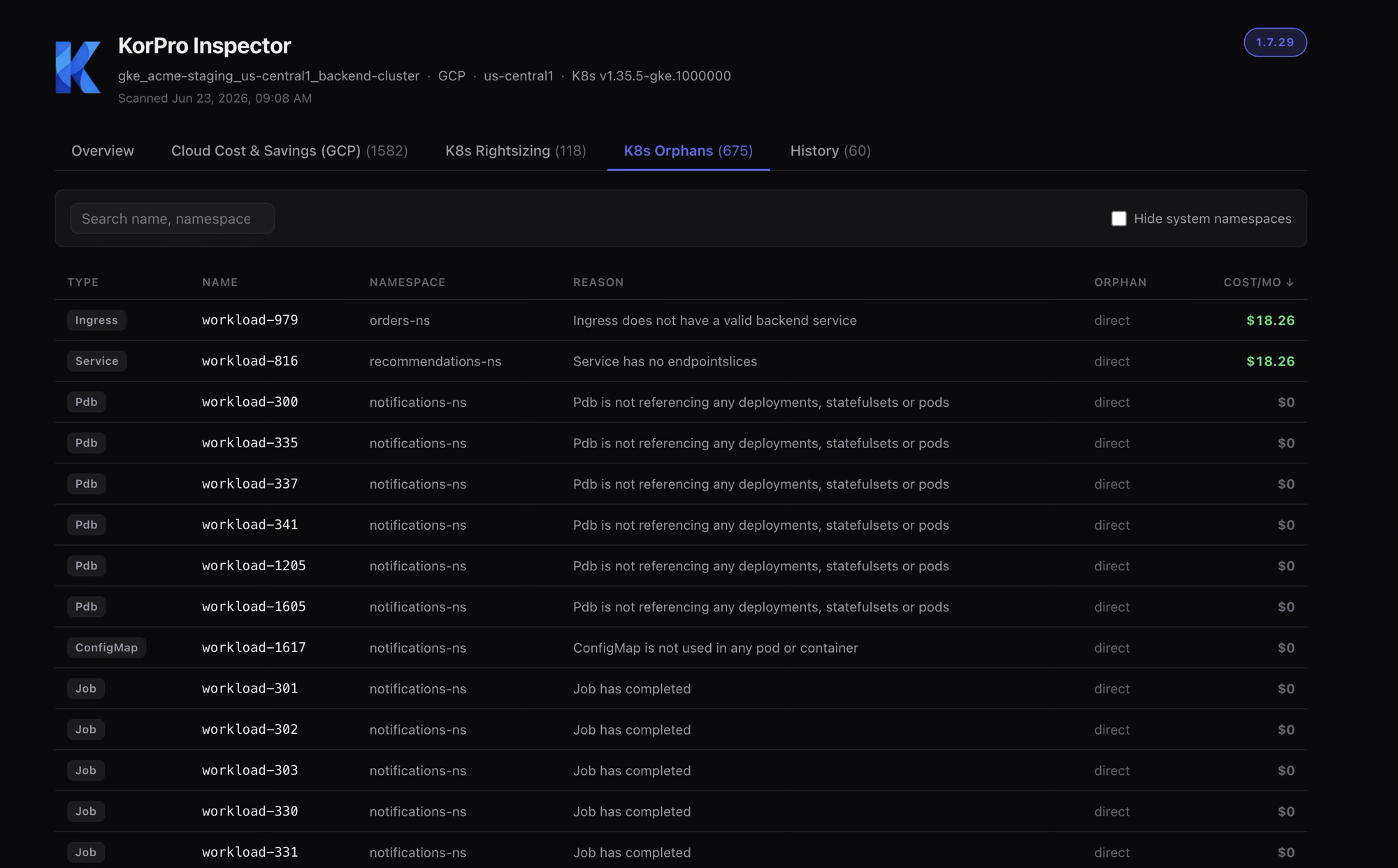
Orphan Cleanup
Delete what nothing uses anymore.
- Scans every workload type — Deployments, Services, ConfigMaps, Secrets, PVCs, Ingresses & more
- Builds a dependency graph and propagates orphan status transitively
- Prices the ones that cost money (load balancers, storage); lists the rest for hygiene
A clean cluster, lower attack surface, and reclaimed spend.
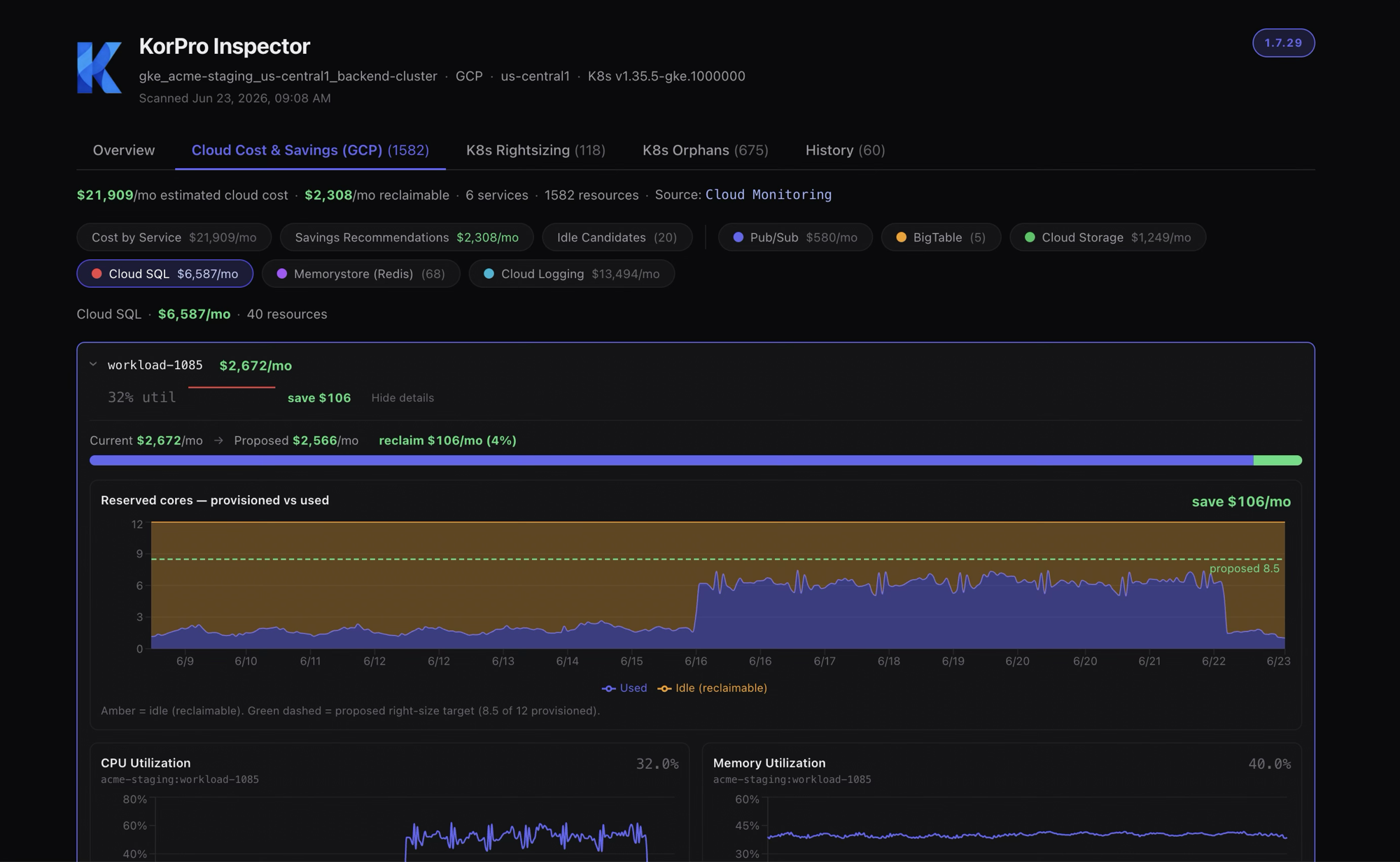
Cloud Cost & Savings
Your Kubernetes bill is only half the story.
- Surfaces waste in the managed services around your cluster — databases, caches, logging, storage & queues
- Right-sizes idle reserved capacity and over-provisioned tiers to real P95 usage
- Shows Current → Proposed cost, the reclaimable amount, and a copy-paste remediation + AI prompt
The expensive, easy-to-miss cloud waste — surfaced and quantified.
Now optimizing your AI bill, too — meet Tokor
The same waste we hunt in Kubernetes is showing up in AI coding bills: the most expensive model runs every task. Tokor routes each task to the cheapest capable model across AWS Bedrock, Azure AI Foundry, and Google Vertex — and proves the net-of-cache dollars saved. Self-hosted, manager-controlled, built for teams of 20+ developers.
The Problem
Kubernetes waste is invisible — until the bill arrives
Teams over-provision to stay safe and rarely clean up. Over-sized requests, idle workloads, orphaned objects, and forgotten cloud services quietly drain your budget.
of Kubernetes resources are unused on average
average CPU over-provisioning across clusters
of running pods are idle — zero traffic, wasted compute
One command. Full cluster efficiency.
Install KorPro Inspector and watch it scan right-sizing opportunities, idle workloads, orphaned resources, and managed cloud-service waste in real time.
How It Works
Three steps to your first multi-cluster cost audit
No lengthy onboarding. No sales calls. Just sign up, deploy a read-only agent, and see every right-sizing, orphan, and cloud-cost finding with its dollar impact.

Create Account
Sign up for free — no credit card, no sales call. You'll get immediate access to your KorPro dashboard.
- Free tier — no credit card required
- Instant dashboard access
- Works with GKE, EKS, and AKS
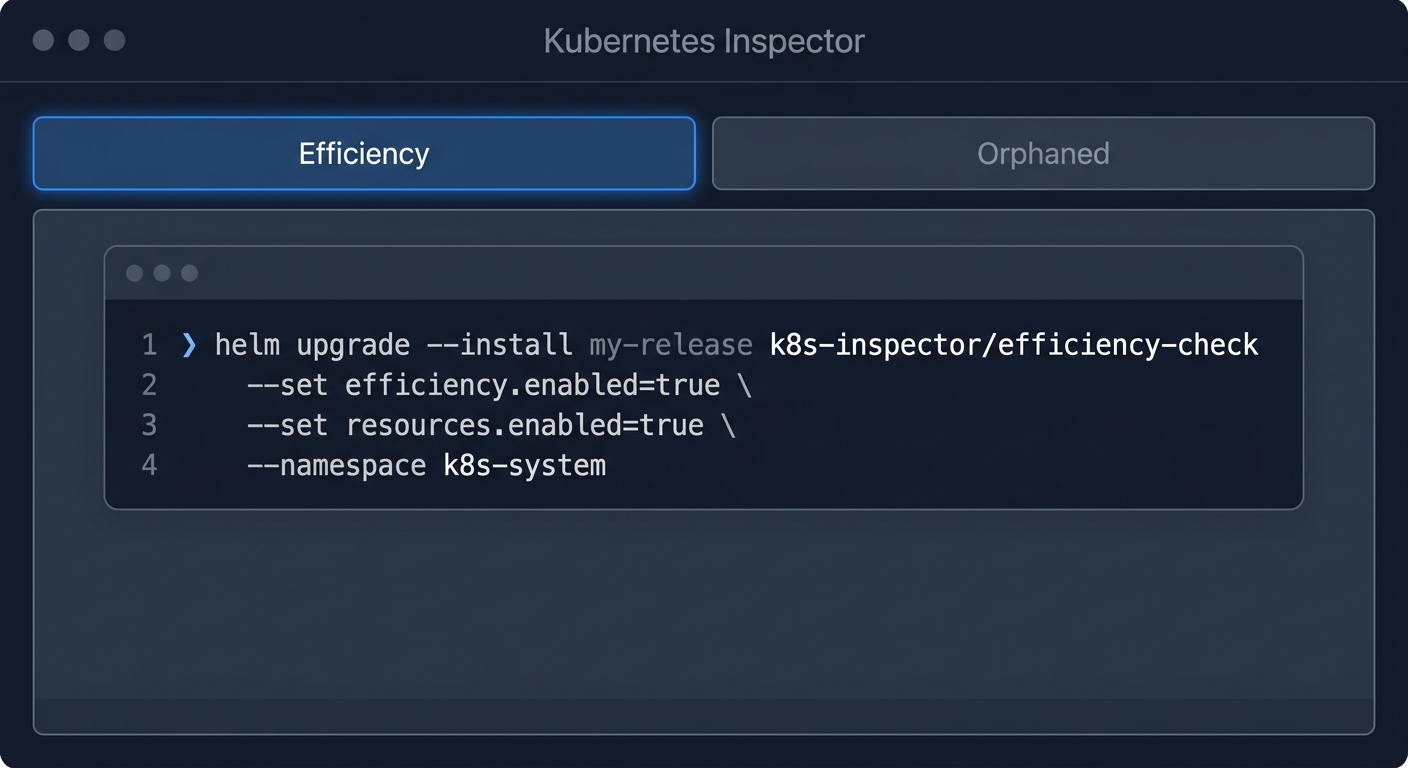
Install Agent
Deploy a lightweight, read-only agent into your own cluster with one Helm command — fully self-hosted. Choose Efficiency mode (default) for rightsizing + idle detection, or Orphaned-only for a lighter install.
Rightsizing + idle + orphaned · installs Prometheus (~150 MiB)
helm upgrade --install korpro-inspector \
  oci://ghcr.io/kortechnologies/charts/korpro-inspector \
  --namespace korpro-system --create-namespace \
  --set licenseKey="<your-license-key>" \
  --set clusterName="<your-cluster-name>" \
  --set efficiency.enabled=true
- Efficiency mode: rightsizing + idle + orphaned
- Orphaned-only: lightweight, no Prometheus
- Auto-detects cloud provider & region

View Resources & Costs
See right-sizing recommendations, idle workloads, orphaned resources, and managed cloud-service savings across your clusters — each with its estimated monthly cost and exact fix.
- Full resource list with cost per item
- Monthly & yearly savings projections
- Export reports for FinOps reviews
Detection Coverage
Find every unused resource in your cluster
KorPro analyzes 25+ Kubernetes resource types against live cluster state to surface orphaned, unreferenced, over-provisioned, and idle objects across every namespace — plus the managed cloud services behind them.

ConfigMaps
Not referenced by any pod, env var, or volume mount.
Secrets
No pod, env, volume, or Ingress TLS uses it.
PVCs
Not mounted by any running pod.
Services
No valid backing endpoints found.
Deployments
Zero replicas — no active workload.
ServiceAccounts
No pod or RoleBinding references it.
Ingresses
Backend service missing or invalid.
HPAs
Target Deployment or StatefulSet is missing.
Savings and health scores across every cluster
Right-sizing, orphaned resources, cloud-service savings, cost per item, and health scores — exactly what you'll see after your first audit.
Features
Kubernetes & cloud cost efficiency at enterprise scale
Multi-Cloud Support
GKE, EKS, and AKS — the Inspector auto-detects your cloud provider and region inside the cluster
Cost Savings
Monthly and yearly estimates for unused and over-provisioned resources
Cloud Cost & Savings
Surfaces waste in the managed services around your cluster — databases, caches, logging & storage — with Current → Proposed cost and a copy-paste fix
Health Scores
Cluster health, efficiency metrics, and security risk
In-Cluster Inspector
A lightweight agent runs inside your cluster. Your credentials never leave your environment — only findings are reported.
Audit Mode
Review everything before cleanup — nothing changes without approval
Resource Detection
ConfigMaps, Secrets, PVCs, Deployments, Services, and more
REST API
Integrate into CI/CD pipelines and custom workflows
Modern Web UI
Interactive dashboards with real-time updates and exports
Rightsizing Analysis
CPU and memory recommendations per workload — stop paying for over-provisioned containers
Idle Workload Detection
Flags pods and deployments with zero traffic that silently drain your compute budget
Use Cases
Built for DevOps Leads and FinOps teams
Open Source → Enterprise
Why teams upgrade to KorPro
Everything in Kor, plus an automated in-cluster Inspector, right-sizing, transitive orphan detection, cloud cost analysis, and a full SaaS dashboard.
 KorPro
From the Blog
Kubernetes Cost Optimization Resources
Kubernetes Spending $5K/Month? Here's Your Cost Recovery Plan
Real-world playbook for recovering wasted Kubernetes spend across GKE, EKS, and AKS clusters.
Beyond the Cluster: Cutting Managed Cloud-Service Waste
Your Kubernetes bill is half the story. Find idle databases, caches, and logging spend around your cluster.
Kubernetes Cost Recovery: Reclaim Wasted Spend
Most clusters waste 20–40% of cloud spend. Here's a proven process to find and recover it.
Kubernetes Cost Optimization: The Complete Guide
From rightsizing requests to removing ghost resources — the full playbook for cutting K8s cloud spend.
FinOps Guide to Kubernetes Waste
Apply FinOps principles to Kubernetes: identify waste, build accountability, and reduce your cloud bill.
P95 + Headroom: Right-Size Without Throttling
How to cut over-provisioned CPU and memory using real usage — without risking your workloads.
How to Reduce AI Coding Costs Across a Dev Team
AI coding tools bill every task at premium rates. Cut spend with model routing and honest measurement.
Why Token-Reduction Percentages Lie About AI Savings
A '40% fewer tokens' headline isn't 40% off your bill. Measure net-of-cache dollars instead.
Kubernetes Spending $5K/Month? Here's Your Cost Recovery Plan
Real-world playbook for recovering wasted Kubernetes spend across GKE, EKS, and AKS clusters.
Beyond the Cluster: Cutting Managed Cloud-Service Waste
Your Kubernetes bill is half the story. Find idle databases, caches, and logging spend around your cluster.
Kubernetes Cost Recovery: Reclaim Wasted Spend
Most clusters waste 20–40% of cloud spend. Here's a proven process to find and recover it.
Kubernetes Cost Optimization: The Complete Guide
From rightsizing requests to removing ghost resources — the full playbook for cutting K8s cloud spend.
FinOps Guide to Kubernetes Waste
Apply FinOps principles to Kubernetes: identify waste, build accountability, and reduce your cloud bill.
P95 + Headroom: Right-Size Without Throttling
How to cut over-provisioned CPU and memory using real usage — without risking your workloads.
How to Reduce AI Coding Costs Across a Dev Team
AI coding tools bill every task at premium rates. Cut spend with model routing and honest measurement.
Why Token-Reduction Percentages Lie About AI Savings
A '40% fewer tokens' headline isn't 40% off your bill. Measure net-of-cache dollars instead.
Your first multi-cluster audit is 5 minutes away
Create an account, install the agent, and see right-sizing, orphan, and cloud-cost savings with the dollar impact of each. No sales calls. No credit card.
Read-only audit • GKE, EKS & AKS • First results in 5 minutes
Free Kubernetes Tools
Estimate your savings before you sign up
Waste Calculator
Enter your cluster size and see how much you're likely wasting on over-provisioned and orphaned resources.
Calculate savingsROI Calculator
See your KorPro payback period and net annual savings based on your monthly K8s spend.
Calculate ROIKubernetes Glossary
42 Kubernetes terms explained for DevOps, platform engineering, and FinOps teams.
Browse terms